
浏览器事件循环宏任务还有优先级?

🎈前言
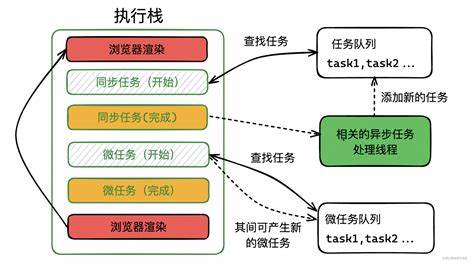
一般来说,我们认为的事件循环是这样子的:浏览器内部有任务队列(Task Queues,我们说的“宏任务”就被装在里面)和微任务队列,事件循环就是循环执行下面 3 个步骤:
- 如果任务队列有就绪的任务,取出一个来执行。
- 执行完后,检查微任务队列,如果有微任务,取出来执行,直至微任务队列为空。
- 如有需要,浏览器进行渲染。最后进入下一次的事件循环。
用这张网上找到的图作为示例:
虽然这样子理解已经够用了,但是任务队列还有更加深入的机制,不同类型的任务(宏任务)队列之间是存在优先级区别的。
我想进一步了解一下浏览器的事件循环机制,就有了这篇博客。
🎆任务队列
先来重新回顾一下任务队列是什么东西。我们来看 HTML 标准 写的
An event loop has one or more task queues.
A task queue is a set of tasks.Task queues are sets, not queues, because the event loop processing model grabs the first runnable task from the chosen queue, instead of dequeuing the first task.
事件循环有一个或多个任务队列,任务队列是任务的集合,而不是一个队列的数据结构。
Essentially, task sources are used within standards to separate logically-different types of tasks, which a user agent might wish to distinguish between. Task queues are used by user agents to coalesce task sources within a given event loop.
客户端使用任务源(Task Sources)来对任务进行分类,不同的任务队列被用于处理不同任务源的任务。
看到这里可以发现,其实“任务的优先级”是任务队列的优先级。
在 HTML 标准 中,有以下的任务源:
- DOM 操作(DOM manipulation task source):用于响应 DOM 操作,例如在元素被插入文档时以非阻塞的事件。
- 用户交互任务源(user interaction task source):用于响应用户交互的特性,例如响应用户输入而触发的事件(例如鼠标键盘事件,
click之类的)。 - 网络任务源(networking task source):用于响应网络请求。
- 导航任务源(navigation and traversal task source):用于响应浏览器导航和 histroy 查询。
- 渲染任务源(rendering task source):仅用于更新渲染。
这里其实是没有写明任务源和任务队列的对应关系的,具体是由浏览器厂商去实现的。
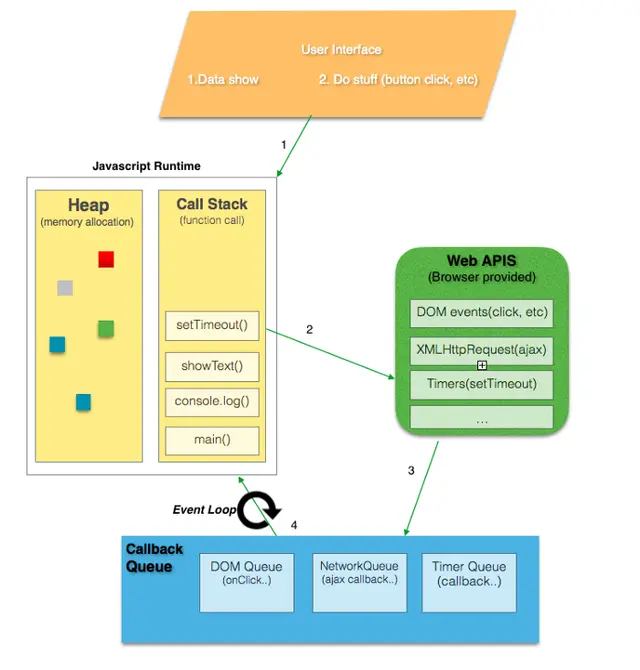
下面这张图更好地说明了任务队列的存在:
🎉任务队列的优先级
HTML 标准虽然定义了任务的来源和任务队列,但是没有定义任务的优先级,这由浏览器厂商进行实现。在大多浏览器中,user interaction 相关的任务拥有最高的优先级,timer 相关的任务优先级则较低。
W3C 发表的 Prioritized Task Scheduling 则给出了 3 种优先级:
- user-blocking
- user-visible
- background
user-blocking 是最高优先级,是指那些必需尽快执行,否则会影响用户体验,例如响应用户输入和更新视口内的 UI 状态等等。
user-visible 是次一级的优先级,是默认的优先级,它产生的变化是用户不会立马察觉到或者对用户体验必不可少的。
background 是最低的优先级,它适用于那些对时间不敏感的任务,例如背景日志处理、指标分析或初始化某些第三方库等。
网上也有博客写到:在目前 chrome 浏览器的实现中,至少包含了下面的队列:
- 延时队列:用于存放计时器到达后的回调任务,优先级低
- 交互队列:用于存放用户操作后产生的事件处理任务,优先级高
虽然上班太累了没有太多精力去阅读源码,但是我们可以从 chrome 源码的注释中了解到相关信息:
c- // TaskQueueImpl has four main queues:
- //
- // Immediate (non-delayed) tasks:
- // |immediate_incoming_queue| - PostTask enqueues tasks here.
- // |immediate_work_queue| - SequenceManager takes immediate tasks here.
- //
- // Delayed tasks
- // |delayed_incoming_queue| - PostDelayedTask enqueues tasks here.
- // |delayed_work_queue| - SequenceManager takes delayed tasks here.
- //
🎃防饥饿机制
HTML 标准中提到了防饥饿机制但是没有更深入的说明,应该是由浏览器厂商自己实现的。
For example, a user agent could have one task queue for mouse and key events (to which the user interaction task source is associated), and another to which all other task sources are associated. Then, using the freedom granted in the initial step of the event loop processing model, it could give keyboard and mouse events preference over other tasks three-quarters of the time, keeping the interface responsive but not starving other task queues. Note that in this setup, the processing model still enforces that the user agent would never process events from any one task source out of order.
🔍测试
主要是参考了这个博文聊聊浏览器宏任务的优先级和 StakeOverflow 上面的问题 Is there really a prioritization system for the task-queues?,提供的测试代码,这里就测试一下不同任务的优先级。要注意的是,相同优先级的任务可能会因为调用顺序改变而改变代码执行顺序,建议调换任务调用的顺序多测一下。
首先要开启实验性功能,chrome 和 edge 上,地址栏输入 chrome://flags,开启这个 Experimental Web Platform features

测试代码如下所示:
js- const queueOnDOMManipulationTaskSource = (cb) => {
- const script = document.createElement("script");
- script.onerror = (evt) => {
- script.remove();
- cb();
- };
- script.src = "";
- document.head.append(script);
- };
- const queueOnTimerTaskSource = (cb) => {
- setTimeout(cb, 0);
- }
- const queueOnMessageTaskSource = (cb) => {
- const { port1, port2 } = new MessageChannel();
- port1.onmessage = (evt) => {
- port1.close();
- cb();
- };
- port2.postMessage("");
- };
- const queueOnHistoryTraversalTaskSource = (cb) => {
- history.pushState("", "", location.href);
- addEventListener("popstate", (evt) => {
- cb();
- }, { once: true });
- history.back();
- }
- const queueOnNetworkingTaskSource = (cb) => {
- const link = document.createElement("link");
- link.onerror = (evt) => {
- link.remove();
- cb();
- };
- link.href = ".foo";
- link.rel = "stylesheet";
- document.head.append(link);
- };
- const makeCB = (log) => () => console.log(log);
- console.log("The page will freeze for 3 seconds, try to click on this frame to queue an UI task");
- // let the message show
- setTimeout(() => {
- window.scheduler?.postTask(makeCB("queueTask background"), {
- priority: "background"
- });
- queueOnHistoryTraversalTaskSource(makeCB("History Traversal"));
- queueOnNetworkingTaskSource(makeCB("Networking"));
- queueOnTimerTaskSource(makeCB("Timer"));
- // the next three are a tie in current Chrome
- queueOnMessageTaskSource(makeCB("Message"));
- window.scheduler?.postTask(makeCB("queueTask user-visible"), {
- priority: "user-visible"
- });
- queueOnDOMManipulationTaskSource(makeCB("DOM Manipulation"));
- window.scheduler?.postTask(makeCB("queueTask user-blocking with delay"), {
- priority: "user-blocking",
- delay: 1
- });
- window.scheduler?.postTask(makeCB("queueTask user-blocking"), {
- priority: "user-blocking"
- });
- document.addEventListener("click", makeCB("UI task source"), {
- once: true
- });
- const start = performance.now();
- while (start + 3000 > performance.now());
- }, 1000);
我们可以发现,在不同浏览器上优先级是有所区别的。这个博文聊聊浏览器宏任务的优先级指出,在 90.0.4430.212 版本的 chrome 上,user-blocking = user interaction > user-visible = DOM manipulation = timer = MessageChannel = naviation and traversal > networking > background
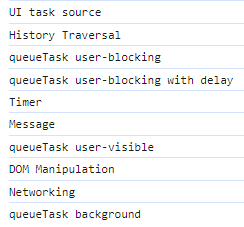
在 128.0.2739.42 的 edge 浏览器上,输出顺序如下:
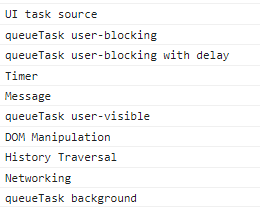
在 116.0.5845.97 的 chrome 浏览器上,输出顺序如下:
这似乎是一个和浏览器实现有关的问题…,基本上是响应用户操作的具有较高优先级。
🎁结语
这篇博客简要地对任务队列及其优先级进行了介绍。在 HTML 标准文档中,任务的优先级其实是任务队列的优先级,它和任务源有关。此外,W3C 给出了三个优先级,依次是 user-blocking、user-visible、background。但是具体的优先级得看各家浏览器厂商具体实现,基本上是响应用户操作的具有较高优先级。
参考:
https://juejin.cn/post/7202211586676064315
https://blog-joy-peng.netlify.app/blog/事件循环中宏任务的优先级及任务调度
https://html.spec.whatwg.org/multipage/webappapis.html#event-loops
https://wicg.github.io/scheduling-apis/#sec-task-signal
https://stackoverflow.com/questions/70900239/is-there-really-a-prioritization-system-for-the-task-queues/70913524#70913524